Product Overview
This Bluetooth headset delivers professional-grade performance for truck drivers, office workers, and mobile professionals who need reliable, hands-free communication. Featuring the latest Bluetooth 5.2 technology, advanced noise cancellation, and an ultra-comfortable single-ear design, it’s built to keep you connected and focused—whether you’re on the road, in the cockpit, or at your desk. With up to 60 hours of music playback, intuitive controls, and dual-device pairing capability, this wireless headset ensures seamless operation across smartphones, PCs, and computers. The H1 model combines essential features like one-button mute, multipoint connectivity, and long-lasting comfort into a sleek, lightweight package designed for all-day use.
Key Features
- Latest 5.2 Bluetooth Chip: Offers faster pairing, stronger signal stability, lower power consumption, and reduced interference. Supports dual-device connection, allowing you to switch between a phone and computer effortlessly.
- Advanced ENC Noise Cancellation: Utilizes Environmental Noise Cancellation (ENC) technology to filter out up to 95% of background noise—perfect for noisy environments like airports, highways, or open-plan offices. Ensures crystal-clear voice transmission for both you and your caller.
- One-Button Mute Function: Instantly activate or deactivate mute during calls with a dedicated button, giving you full control over your audio presence without interrupting your workflow.
- Ultra-Comfortable Over-Ear Design: Features soft protein leather ear cushions wrapped around breathable memory foam, a stretchable metal headband, and silicone anti-slip pads. Lightweight and ergonomic, it minimizes pressure and fatigue for extended wear.
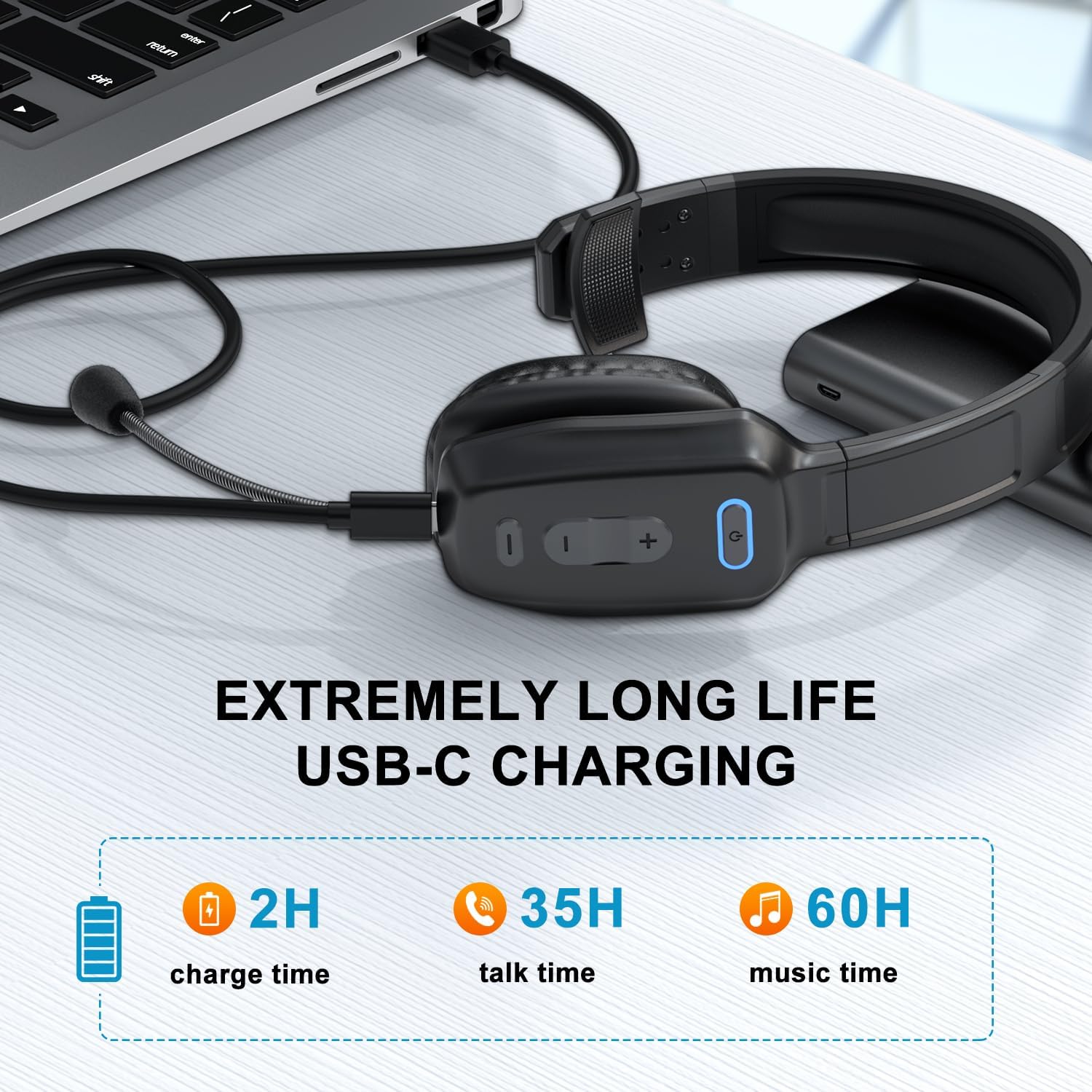
- 60-Hour Battery Life: Built-in 400mAh battery provides up to 60 hours of music playback, 35 hours of talk time, and 2,100 hours of standby. Ideal for long shifts or multi-day trips without frequent recharging.
- Multipoint Connectivity: Connect simultaneously to two devices—such as a smartphone and laptop—and switch between them seamlessly for calls, music, or work tasks.
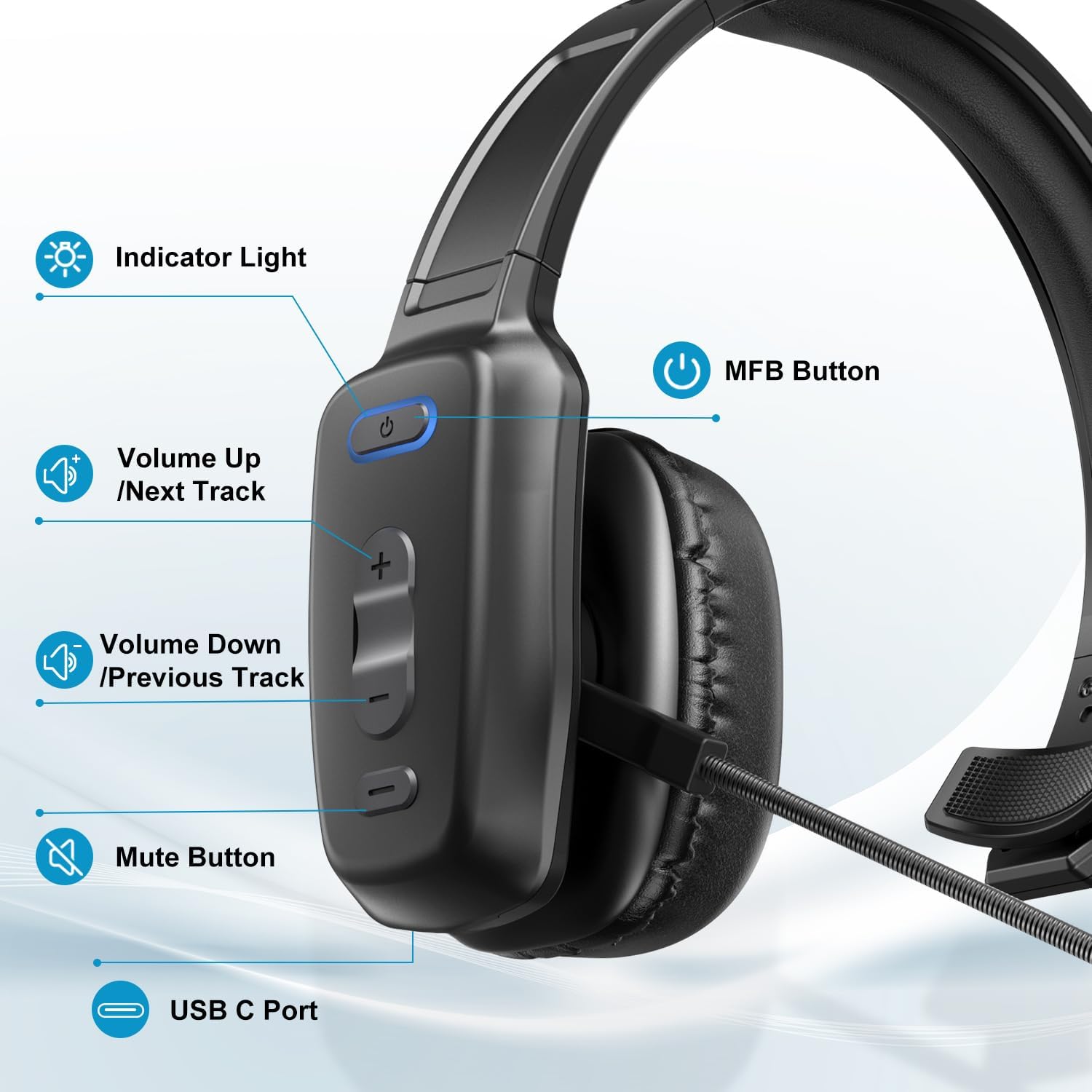
- Intuitive Control Panel: Includes multi-functional buttons for call management, volume adjustment, track navigation, Siri activation, and power functions. Simple press-and-hold or single-click actions make operation efficient and accessible.
Technical Specifications
- Bluetooth Version: 5.2
- Battery Capacity: 400mAh
- Music Playback Time: Up to 60 hours
- Talk Time: Up to 35 hours
- Standby Time: Up to 2,100 hours
- Effective Range: Within 10 meters
- Compatibility: Smartphones (iPhone/Android), PCs, and computers
- Noise Cancellation: ENC technology reducing ambient noise by 95%
- Controls: Power, call answer/end, reject, redial, Siri, volume up/down, mute, next/previous track
Benefits & Use Cases
Designed for professionals who demand clarity, comfort, and reliability, this headset excels in demanding work environments. Truck drivers can maintain clear communication during long hauls without distraction from road noise or engine sounds. Office workers benefit from discreet, hands-free calling that won’t disturb colleagues. Remote workers appreciate the ability to stay connected while managing multiple devices—switching from phone calls to video meetings or music playback on the fly.
The single-ear design reduces ear fatigue and allows for situational awareness, making it ideal for tasks requiring attention to surroundings. The noise-canceling microphone ensures your voice is heard clearly, even when you’re in a busy street or windy outdoor setting. With a range of up to 10 meters, users enjoy freedom of movement while staying within optimal connection distance.
Whether you’re coordinating deliveries, attending virtual meetings, or simply enjoying music during downtime, the H1 headset supports your productivity and comfort throughout the day.
Important Notes
The headset automatically reconnects to previously paired devices within 10 minutes of being powered on. If reconnection fails after this window, manual re-pairing may be required. To delete stored pairing records, press and hold both the MFB (Multi-Function Button) and Volume Down buttons simultaneously for five seconds. After deletion, the device will not auto-connect to any previously saved device.
If you experience difficulty connecting to a PC, ensure your computer has a compatible Bluetooth driver installed. For best results, update your system’s Bluetooth software before pairing. During phone calls, some devices default to using the phone’s internal microphone and speaker. After answering a call, confirm that ‘H1’ is selected as the audio input and output source in the call interface to enable proper microphone pickup and audio playback through the headset.
Support is available via the brand’s after-sales service listed on the product packaging or through the retailer’s customer support portal. For troubleshooting or usage questions, visit the store page and click the support button to contact customer service directly.







Unlock the Power of H1 Business Bluetooth Headphones: Elevate Your Professional Edge


How to reconnect and what to do if reconnection fails?
When H1 is successfully connected to the phone the first time, it will automatically search and reconnect the device after power on. If it fails, please re-pair and connect. H1 can reconnect within 10 mins, if more than 10 mins will be turned off.
What should I do if I need help using the H1 headset?
If you have any questions, please contact the brand after-sales on the box or enter the store and click on the button to ask questions.
How can I delete the paired record?
Press and hold the MFB and Volume – buttons for 5 seconds to clear the pairing record. After deletion, H1 will not connect the device automatically.
Why can’t the H1 connect to the PC?
Check if there is a Bluetooth driver on your computer? If not, you need to install the Bluetooth driver.
Why can’t i hear the caller’s voice when i make a call with the headset connected, and it’s hard for them to hear me?
Because the audio of some mobile phones is selected by default during a call, please confirm the Audio selection [H1] on the call interface after answering the call.
Cutting-edge Noise Cancelling – Bluetooth headset with microphone adopts powerful ENC noise cancellation technology that eliminates 95% of harmful interfering noises, which means that the far-end caller won’t notice even if you’re calling in the noise-filled airport. Hence well loved by truckers and businessmen.
Comfortable Fit – Overturn the large and bulky impression left by the traditional Bluetooth headphone. Ultra-soft protein leather wrapped around soft breathable memory foam care for your ear and overhead, equipped with a lightweight metal stretchable headband soft ear cushions, and a silicone anti-slip pad that offers all-day comfort and stability.
60Hr Long Battery Life – The wireless headset built-in large 400mAh battery which provides 2100 hours of standby time, 35 hours of talk time, and 60 hours of music time, making work headset a reliable assistant to accompany you all day long.
Dual Connection – Newest 5.2 Version Bluetooth ensures a fast and stable connection, Bluetooth wireless headset provides you with a pleasant calling experience. Combined with dual connectivity tech and is widely compatible for iPhone Android cell phones, computers, and pc within 10m.
Updated Control Panel – Simply click the mute button to control mute at any time during a cellphone call. Push up/down power button makes it more convenient to turn the headset on/off. Pair with an extra-large function key and volume keys to meet the user’s need for simple and efficient operation.


Power on: Press 3s
Power off: Press 5s
Answer/End Calls /Play/Pause: Press once
Reject Calls: Press 2s
Redial Calls: Double Press
Siri: Press 1s

Next Track:Press and hold
Volume Up: Press once

Previous Track: Press and hold
Volume Down:Press once

Mute/Unmute: Press once